
Admin Guide
This guide is for Snowflake admins, implementation leads, and EntryLayer org admins who keep the installed Native App operating safely.
When to use this guide
Section titled “When to use this guide”Use this guide when you need to:
- grant app access roles
- assign or revoke seats
- configure source caller rights
- use diagnostics
- run controlled operational SQL
- configure optional MCP client access
- suspend, resume, or troubleshoot the app
Control planes
Section titled “Control planes”EntryLayer administration has separate control planes:
| Control plane | What it does |
|---|---|
| Snowflake application roles | Let Snowflake roles open or administer the installed app. |
| EntryLayer seat type | Controls product capability: view, act, build, admin. |
| Project permissions | Control actual record access such as can_read and can_edit. |
| Snowflake source grants | Control source metadata, rows, and values. |
| MCP client configuration | Lets compatible clients call the Snowflake-managed ENTRYLAYER_MCP server. |
Keep these separate when troubleshooting access.
Bootstrap checklist
Section titled “Bootstrap checklist”- Grant
ENTRYLAYER_USERto the Snowflake roles that should open the app. - Grant
ENTRYLAYER_ADMINonly to a small bootstrap/recovery role. - Assign the first admin seat.
- Grant caller rights on the source databases EntryLayer should browse.
- Open Org Settings and use Data Access Setup diagnostics.
- Create a test source-connected project and verify access with a real user.
User access roles
Section titled “User access roles”Grant app access to a Snowflake role:
GRANT APPLICATION ROLE ENTRYLAYER.ENTRYLAYER_USER TO ROLE MY_APP_USER_ROLE;Grant SQL administration only to controlled roles:
GRANT APPLICATION ROLE ENTRYLAYER.ENTRYLAYER_ADMIN TO ROLE MY_ENTRYLAYER_ADMIN_ROLE;Replace ENTRYLAYER with the installed app name if it differs.
Seat management
Section titled “Seat management”Use the UI for normal membership operations: Org Settings -> Members & Licenses.
Use SQL for bootstrap, recovery, or controlled admin automation:
CALL ENTRYLAYER.API.SET_USER_SEAT('JSMITH', 'build');CALL ENTRYLAYER.API.REVOKE_USER_SEAT('CONTRACTOR_1');CALL ENTRYLAYER.API.LIST_USERS();Seat type controls product capability, not record visibility.
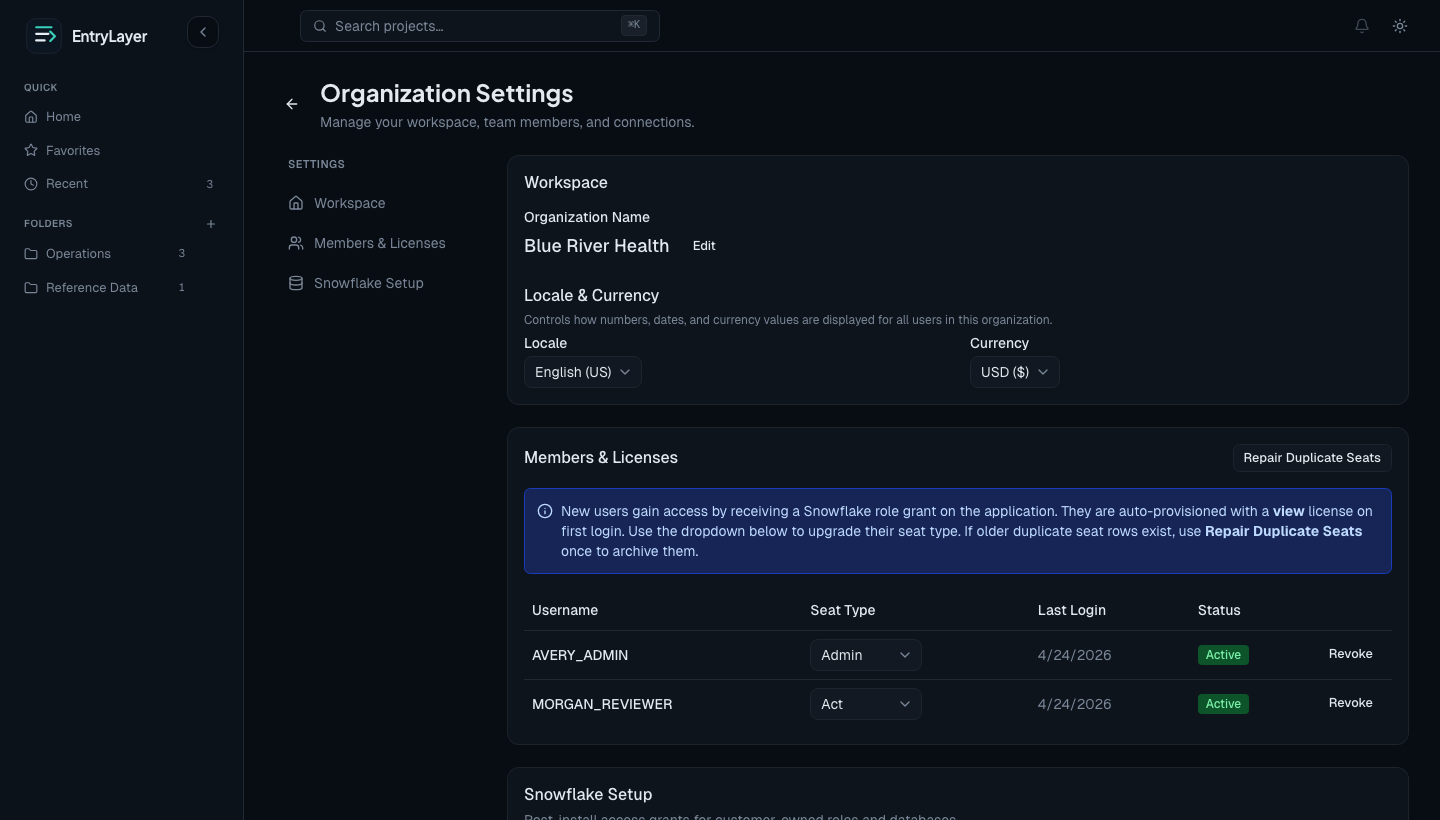
Project access controls
Section titled “Project access controls”Project permissions, not seat type alone, control submission data access.
Important reminders:
adminseat does not automatically grant submission visibilitycan_managedoes not automatically grantcan_readcan_read_allandcan_edit_allwiden scope from own records to all records- field-group permissions can further restrict visible/editable fields
Snowflake source access
Section titled “Snowflake source access”EntryLayer uses Restricted Caller Rights for consumer-owned data where Snowflake supports it.
Common grants:
GRANT CALLER USAGE ON DATABASE MY_DATABASE TO APPLICATION ENTRYLAYER;GRANT INHERITED CALLER USAGE ON ALL SCHEMAS IN DATABASE MY_DATABASE TO APPLICATION ENTRYLAYER;GRANT INHERITED CALLER REFERENCES, SELECT ON ALL TABLES IN DATABASE MY_DATABASE TO APPLICATION ENTRYLAYER;GRANT INHERITED CALLER REFERENCES, SELECT ON ALL VIEWS IN DATABASE MY_DATABASE TO APPLICATION ENTRYLAYER;GRANT INHERITED CALLER REFERENCES, SELECT ON ALL SEMANTIC VIEWS IN DATABASE MY_DATABASE TO APPLICATION ENTRYLAYER;The Object Explorer and source-connected queues reflect the signed-in user’s Snowflake visibility on supported sources.
Day-2 operations checklist
Section titled “Day-2 operations checklist”Use this checklist after initial setup:
- review seat assignments periodically
- keep
ENTRYLAYER_ADMINlimited to admin/operator roles - use diagnostics before changing source grants
- verify source visibility with real user roles after grant changes
- monitor app service health when users report availability issues
- use App Public Views and documented SQL API calls for inspection
Monitoring and operations
Section titled “Monitoring and operations”Check service health:
SELECT SYSTEM$GET_SERVICE_STATUS('ENTRYLAYER.CORE.ENTRYLAYER_SERVICE');CALL SYSTEM$GET_SERVICE_LOGS('ENTRYLAYER.CORE.ENTRYLAYER_SERVICE', 0, 'api', 100);CALL SYSTEM$GET_SERVICE_LOGS('ENTRYLAYER.CORE.ENTRYLAYER_SERVICE', 0, 'web', 100);Suspend or resume the app:
CALL ENTRYLAYER.API.SUSPEND_APP();CALL ENTRYLAYER.API.RESUME_APP();These operations should be limited to roles with ENTRYLAYER_ADMIN.
Diagnostics and inspection
Section titled “Diagnostics and inspection”Prefer documented diagnostics and inspection surfaces:
- Org Settings -> Data Access Setup
ENTRYLAYER.APP_PUBLICviewsCALL ENTRYLAYER.API.HELP()CALL ENTRYLAYER.API.AGENT_MANIFEST()- SQL API read-only procedures such as
LIST_USERS,LIST_PROJECTS, andLIST_ACCESS
Build customer workflows on documented UI diagnostics, APP_PUBLIC views, and API procedures.
MCP client access
Section titled “MCP client access”EntryLayer publishes API.ENTRYLAYER_MCP for MCP-compatible clients. Treat it as an optional companion to the SQL API:
- it is granted only to
ENTRYLAYER_ADMIN - it uses a Snowflake-managed MCP server, not a custom EntryLayer SPCS MCP endpoint
- it requires MCP client OAuth setup before tools load
- it delegates to the same documented SQL API procedures and response envelopes
Use Snowflake MCP Client Setup when a customer wants Cortex Code or another MCP client to connect. Use Cortex SQL API Skill when the customer wants the lowest-friction Cortex workflow.
Practical admin flow
Section titled “Practical admin flow”- Grant app roles.
- Assign seats.
- Grant caller rights.
- Validate sources through UI diagnostics or documented SQL API calls.
- Grant project permissions intentionally.
- Use App Public Views and billing/operations references for inspection.